
APP Control Voice1.2 - App Store
You'll be able to see results in few seconds.
Publisher Description
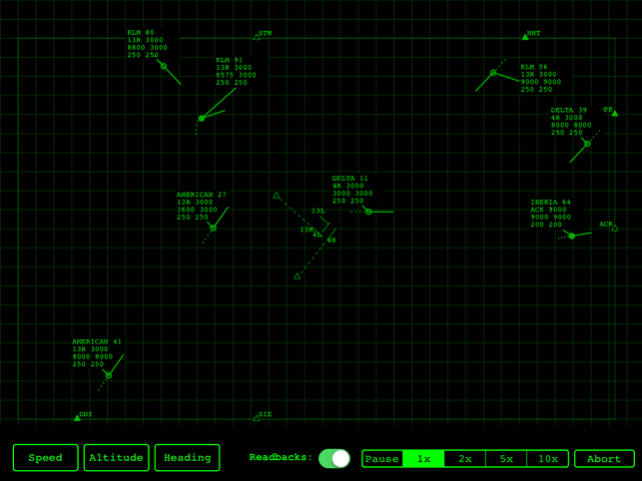
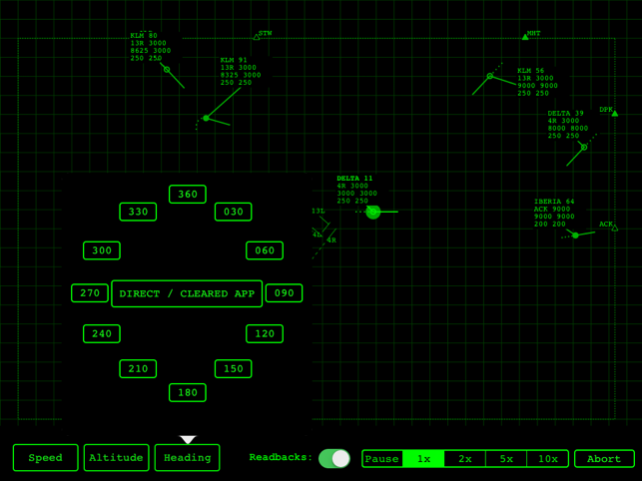
APPControl Voice Edition is an air traffic controller game with voice recognition. You guide the aircraft on your radar screen by talking to your iPad using real ATC clearances like:
- "American 13, Climb and maintain 4 thousand feet"
- "Iberia 56, Turn left heading 2 7 0"
- "Continental 78, speed 2 5 0 knots, proceed direct Bravo India Golf"
- "Delta 32, Cleared for approach runway 2 7 Left"
The app has a practice room to get used to the voice recognition and learn the specific clearances. A touch interface is available too.
As an air traffic controller you must maintain a lateral separation of 3 miles or a vertical separation of 1000 feet between aircraft landing and departing.
Give altitude, speed, heading and direct-to clearances to aircraft and make them reach the initial approach fix or the exit point at requested altitude.
This has many features of real air traffic control systems:
- moveable data blocks with different schemes
- speed vectors and past positions
- short term conflict alerts
This app also has access to the APPControl Online Airports Database, with more than 200 airports, real and imaginary.
The free online leaderboards system let you track your scores online and compare with other players.
Dec 20, 2015 Version 1.2
- Improved speech recognition
- Redesigned HMI
- Improved iOS 9 support
About APP Control Voice
The company that develops APP Control Voice is APPcalyptus UG. The latest version released by its developer is 1.2.
To install APP Control Voice on your iOS device, just click the green Continue To App button above to start the installation process. The app is listed on our website since 2015-12-20 and was downloaded 0 times. We have already checked if the download link is safe, however for your own protection we recommend that you scan the downloaded app with your antivirus. Your antivirus may detect the APP Control Voice as malware if the download link is broken.
How to install APP Control Voice on your iOS device:
- Click on the Continue To App button on our website. This will redirect you to the App Store.
- Once the APP Control Voice is shown in the iTunes listing of your iOS device, you can start its download and installation. Tap on the GET button to the right of the app to start downloading it.
- If you are not logged-in the iOS appstore app, you'll be prompted for your your Apple ID and/or password.
- After APP Control Voice is downloaded, you'll see an INSTALL button to the right. Tap on it to start the actual installation of the iOS app.
- Once installation is finished you can tap on the OPEN button to start it. Its icon will also be added to your device home screen.
Program Details
System requirements
Download information
Pricing
Version History
version 1.2
posted on 2015-12-20
Dec 20, 2015 Version 1.2
- Improved speech recognition
- Redesigned HMI
- Improved iOS 9 support
version 1.2
posted on 2013-01-12
version 1.2
posted on 1970-01-01
2015年12月20日 Version 1.2
- Improved speech recognition
- Redesigned HMI
- Improved iOS 9 support
Disclaimer
Official App Store Link
We do not host APP Control Voice on our servers. We did not scan it for viruses, adware, spyware or other type of malware. This app is hosted by Apple and passed their terms and conditions to be listed there. We recommend caution when installing it.
The App Store link for APP Control Voice is provided to you by apps112.com without any warranties, representations or guarantees of any kind, so access it at your own risk.
If you have questions regarding this particular app contact the publisher directly. For questions about the functionalities of apps112.com contact us.
